Subscribe to the transfer state change event webhook to receive notifications when a transfer status changes.
Use this webhook payload to keep the statuses of your local transfer data storage up to date.
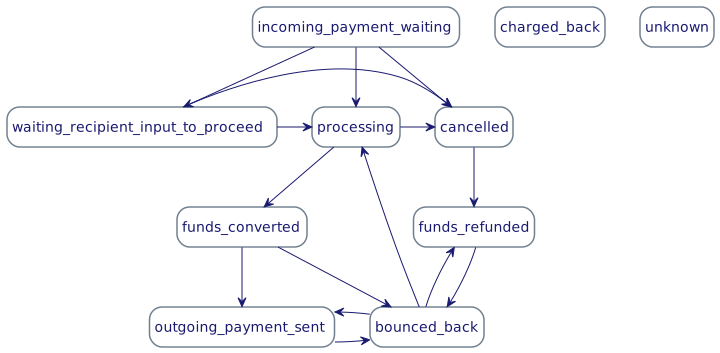
Here is the full list of transfer statuses and what they mean in the order of occurrence:
| Tracking status | Description |
|---|---|
incoming_payment_waiting | The transfer has been submitted and Wise is waiting for the funds to arrive. |
incoming_payment_initiated | The funding has been initiated but the money has not yet arrived to Wise's account. |
processing | Wise has received the funds and is processing the transfer. Processing is a generic term that means Wise is doing behind-the-scenes activities – like AML, compliance, and fraud checks – before the money is sent to the recipient. |
funds_converted | All compliance checks have been completed for the transfer and funds have been converted from the source currency to the target currency. |
outgoing_payment_sent | Wise has paid out funds to the recipient. This is the final state of the transfer, assuming funds will not be returned. When a transfer is in this state, it does not mean the money has arrived in the recipient’s bank account, only that Wise has sent it. |
cancelled | This status is used when the transfer was never funded and therefore never processed. For transfers that were never funded, this is the final state of the transfer. |
funds_refunded | This status indicates a transfer has been refunded to the sender. This is a final state of a transfer that was funded and then cancelled. |
bounced_back | The transfer has bounced back but has not yet been cancelled or refunded. This status means the transfer will either be delivered with delay or it will go into the funds_refunded state. |
charged_back | This status is used when Wise is unable to debit the payer's account for some reason, or the payer requested the funds back. The charged_back status can follow from any other transfer status. |
unknown | This status is used when Wise does not have enough information to move the transfer into a final state. Wise sends out an email for more information when this occurs (for example: the sender requests a refund but Wise doesn't have all necessary account details). |
Transfers support rollback transitions, which allows you to return a transfer back to one of its previous states.
Transfer statuses in the Wise API have different names than what you see on our website or in our app. That’s because we use more consumer-friendly language in our product front end. For example "Completed" on our website means outgoing_payment_sent in the API.
Consider using the following consumer-friendly descriptions in your app for the transfer statuses returned from the Wise API:
| Status | Description |
|---|---|
incoming_payment_waiting | "On its way to Wise" |
incoming_payment_initiated | "On its way to Wise" |
processing | "Processing" |
funds_converted | "Processing" |
outgoing_payment_sent | "Payment sent" |
charged_back | "Funds returned to sender" |
cancelled | "Payment cancelled" |
funds_refunded | "Payment refunded" |
bounced_back | "Bounced back" |
unknown | "Payment status unknown" |
The typical transfers happy path looks like this:
incoming_payment_waiting → processing → funds_converted → outgoing_payment_sent
The outgoing_payment_sent status is the final state of the normal flow and means Wise has sent the payout to the recipient bank/payment network. It does not guarantee the recipient bank has credited the beneficiary account yet.
If the payment fails and is returned, the following unhappy path occurs:
outgoing_payment_sent → bounced_back → processing → cancelled → funds_refunded
This type of flow can occur, for example, if the recipient bank account does not exist or the data is entered incorrectly and the payment is returned to Wise.
Most bounce backs occur within 2-3 business days. However, they can happen up to several weeks after a transfer is sent.
Payment systems in different regions operate at different speeds and frequency. For example, in the UK funds will reach the recipient bank account within few minutes after Wise sends the outgoing payment. However, in the US it usually takes a day until funds are received.
You can retrieve the live delivery estimate for a transfer by its transfer ID. The estimate is the time at which we currently expect the transfer to arrive in the beneficiary's bank account. While this is not a guaranteed time, we work to make these estimates as accurate as possible.
- Production Environmenthttps://api.wise.com/2026Q4/delivery-estimates/{transferId}
- Sandbox Environmenthttps://api.wise-sandbox.com/2026Q4/delivery-estimates/{transferId}
curl -i -X GET \
  'https://api.wise.com/2026Q4/delivery-estimates/12345678?timezone=Asia%2FSingapore' \
  -H 'Authorization: Bearer <YOUR_JWT_HERE>' \
  -H 'X-External-Correlation-Id: f47ac10b-58cc-4372-a567-0e02b2c3d479'
For request/response details, see the delivery estimate endpoint reference.
Since the sandbox environment does not have the full processing capabilities of a live environment, we provide transfer state change simulation endpoints to allow moving transfers to various states, including triggering the Transfer State Change webhook event.
Available statuses (must be called in order):
processingfunds_convertedoutgoing_payment_sentbounced_backfunds_refunded
Fund the transfer first, and wait at least 5 seconds between simulation calls (processing is asynchronous).