As well as swift-in#credit, you can also subscribe to transfer-state-change notifications. This gives you information about all transfers in your Wise account, including the states in an inbound Swift payment.
As you implement this subscription, be sure to handle duplicate messaging about the same transaction.
- Event type:
transfers#state-change - Profile level subscriptions: Supported
- Application level subscriptions: Supported
This event will be triggered every time a transfer's status is updated. Each event contains a timestamp. As we do not guarantee the order of events, please use data.occurred_at to reconcile the order.
If you would like to subscribe to transfer state change events, please use transfers#state-change when creating your subscription.
Note that for all topup-to-balance transfers created, transfers#state-change events will NOT be triggered. To listen to these, subscribe to balances#update webhook.
Transfer resource type (always transfer)
ID of the transfer
ID of the profile that owns the transfer
ID of transfer's recipient account
Current transfer state (see transfer statuses)
Previous transfer state (see transfer statuses) - Note that this will be null for newly created transfers.
When the state change occurred.
You should use a subscription to application webhooks to keep the statuses of your local transfer data storage up to date. The transfers will move through the following statuses in the happy path.
Incoming Payment Waiting ⇒ Processing ⇒ Funds Converted ⇒ Outgoing Payment Sent
Outgoing Payment Sent is the final state of the normal flow. If the payment fails, the following problematic flow will occur. An example would be if the recipient bank account doesn’t exist or the data is entered incorrectly and the payment is returned to Wise. The problematic state flow of transfers is:
Outgoing Payment Sent ⇒ Bounced Back ⇒ Processing ⇒ Cancelled ⇒ Funds Refunded
Most bounce backs occur within 2-3 business days, however this could happen up to several weeks after a transfer is sent.
Transfer state flow
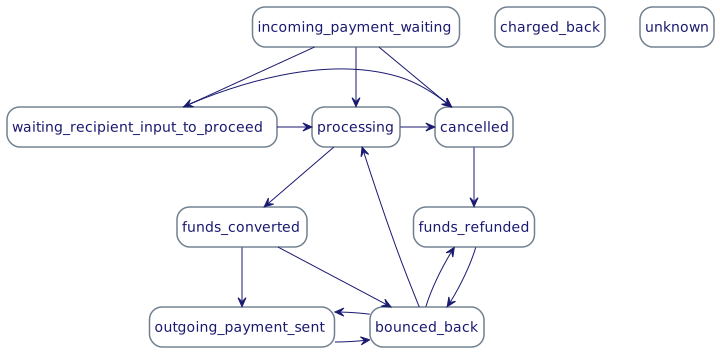
NB: Transfers support rollback transitions. This allows transfers to return back to previous states.
See below for the full list of transfer statuses and what they mean in the order of occurrence.
incoming_payment_waiting – The transfer has been submitted and Wise is waiting for funding to be initiated.
incoming_payment_initiated - The funding has been initiated but the money has not yet arrived in Wise's account.
processing – We have received the funds and are processing the transfer. Processing is a generic term that means we’re doing behind-the-scene activities before the money gets sent to the recipient, such as AML, compliance and fraud checks.
funds_converted – All compliance checks have been completed for the transfer and funds have been converted from the source currency to the target currency.
outgoing_payment_sent – Wise has paid out funds to the recipient. This is the final state of the transfer, assuming funds will not be returned. When a transfer has this state, it doesn’t mean the money has arrived in the recipient’s bank account, just that we have sent it from ours. Note: Payment systems in different countries operate in different speeds and frequency. For example, in the UK, the payment will reach the recipient bank account within few minutes after we send the outgoing payment. However, in the US it usually takes a day until funds are received.
cancelled – This status is used when the transfer was never funded and therefore never processed. This is a final state of the transfer.
funds_refunded – Transfer has been refunded. This is a final state of the transfer.
bounced_back – Transfer has bounced back but has not been cancelled nor refunded yet. This is not a final transfer state, it means the transfer will either be delivered after a delay or it will turn to funds_refunded state.
charged_back - This status is used when we have a problem debiting payer's account or the payer requested money back. Chargeback can happen from any other state.
unknown - This status is used when we don’t have enough information to move the transfer into a final state. We send out an email for more information. For example sender account details to refund money back.
Keep in mind the transfer statuses in our API have different names than what you’ll see on our website or app. That’s because we use more consumer friendly language in the front end of our products. For example "Completed" on our website means outgoing_payment_sent in the API.
You should use the following descriptions in your website or app for the potential statuses we return:
| Status | Description |
|---|---|
| incoming_payment_waiting | "On its way to Wise" |
| incoming_payment_initiated | "On its way to Wise" |
| processing | "Processing" |
| funds_converted | "Processing" |
| outgoing_payment_sent | "Sent" |
| charged_back | "Charged back" |
| cancelled | "Cancelled" |
| funds_refunded | "Refunded" |
| bounced_back | "Bounced back" |
| unknown | "Unknown" |
{
  "data": {
    "resource": {
      "type": "transfer",
      "id": 111,
      "profile_id": 222,
      "account_id": 333
    },
    "current_state": "processing",
    "previous_state": "incoming_payment_waiting",
    "occurred_at": "2020-01-01T12:34:56Z"
  },
  "subscription_id": "01234567-89ab-cdef-0123-456789abcdef",
  "event_type": "transfers#state-change",
  "schema_version": "2.0.0",
  "sent_at": "2020-01-01T12:34:56Z"
}