At any point of time, Wise may trigger refunds to settled transfers and unsettled transfers for reasons such as bounce backs. During these events, if you are using the Net Settlement Refund method, Wise will notify you on the refund through one of the following methods:
- Refund by Webhook
- Refund by CSV
Upon receiving the refund instruction from Wise, you should refund the money back to the customer's bank account or wallet accordingly. As for settlement with Wise, especially for the unsettled transfers, these transfers will still need to be included in the settlement journal.
Wise can inform you about refunds using a webhook request to a URL that you have configured with Wise. Your platform should expose an endpoint to accept this refund webhook and then process the refund either synchronously or asynchronously. We will include in the payload the data you need in order to complete the refund, such as:
- amount
- currency (source currency)
- transfer ID
This webhook event data should be sufficient for you to apply the credit to the correct bank account or other payment mechanism.
You should respond with an HTTP 200 to this API call to acknowledge it was received. You do not necessarily need to process the refund at this point. It could be done as a batch later, but you should store that the refund was requested and manage it internally from this point onwards. Remember also that the customer will be awaiting their refunded money at this point so if possible, it is better to process this quickly.
If a non-200 response is returned to Wise refund webhook request API call, or if it is not responding within a reasonable time period, Wise will resend the webhook request for the same transfer ID. Your system should be able to handle this and not process two refunds.
| Field | Description | Type |
|---|---|---|
data | Object with information about the updated resource. | Object |
data.payoutId | ID to refer to this payout attempt. This is not the transfer ID. | Long |
data.amount | Amount to credit or refund to the account. | Decimal |
data.currency | Currency of the amount to credit or refund, could be useful for partners who support multiple source currencies. | String |
data.transferId | ID of the transfer to refund. | Long |
data.customerTransactionId | The idempotency ID that was sent when creating the transfer. UUID format. | String |
event_type | Type of event, which defines the data object. Always payout#create. | String |
sent_at | Timestamp when event happened. | Timestamp |
{
  "data": {
    "payoutId": 12345,
    "amount": 543.21,
    "currency": "EGP",
    "transferId": 98765,
    "customerTransactionId": "e592a7ba-d7d1-4c28-ac44-10cb091dad07"
  },
  "event_type": "payout#create",
  "sent_at": "2020-10-14T12:43:37Z"
}Similar to the transfer status webhooks, we will send a signature header with each refund webhook request to help you ensure the validity of the API call as coming from Wise.
To ensure that the webhook request is sent by Wise, you should validate the signature using the following keys according to the environment you are using.
MIIBIjANBgkqhkiG9w0BAQEFAAOCAQ8AMIIBCgKCAQEA0U0YsuLEPaUL7RTaMswsQTI6EZujmp2tN+TYs7LEhI6vHaVN81ycMsivAgS+ZNywua3mW4v2KjQd8OrQcrdReRIdiKGqFZXOtvCXgGtDsZjt4dq3s+CUyfHzRPno1TuXt9IdUAD+G8y9PAvARNBRL7QehyRiyKoGaSWghqCek3rMBhxrd2WWSaRJX9QZgWnjgNMWHbDz7clfL3rRgMuYVg/WV7Wa0CVKaZJJJt2KZbUcJg2ONA1ysV4JdzK7t/f6NoxcWWpbZX1Dy8TGQhmOncNfoAXwHzievPzNQQyDcKTlp2f89ggctqHjNXjJp6XY7pO45SrAhzc80VVTLXHukQIDAQAB
MIIBIjANBgkqhkiG9w0BAQEFAAOCAQ8AMIIBCgKCAQEArQ8jMhD5Y8Hbk5UsmezF5yjxGrJV16ZzcXteRFgM0z8jjDHct1bBYYojr2tAmkIg78jjj8KvRcKeDmu2IPSj4kK3va+hyDpoa5QYGDbmjXJQaop07Vsdxv/IWSKBzBHfnl0+p3dfgvnId8uGx7M8/kmFBVF1uVcZg9WecFdOJTF4/mH5HIkc1SltCKmzrZdCHwicQ2t9ZAEaTpZJPa1tyIxW194D6yA3hWruPdVswOL4y5DnzD/cy5/FL3pvAqm8IhachdSodM9wOWse9sFRU3YS1tyn1gkhshgMadRlLwnXiDUeE7ZOHO9fMQ163AGkhWJhdvRzRtSF9cVoLNnTnwIDAQAB
If refund by webhook is not possible, Wise can also notify you about refunds through CSV over an sFTP server. However, this method is less preferred to the webhook refund method as the refund speed is much faster when using the webhook refund method.
Note: Please discuss with your Wise solutions engineer on the specific connection configuration to the sFTP server.
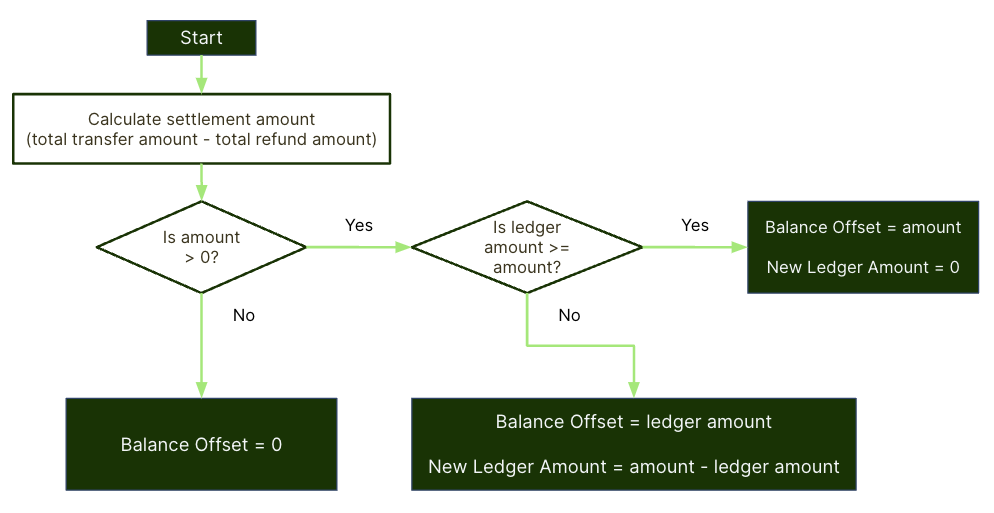
Due to the refund process, there may be occasions where the total amount in refunds to be higher than the total amount to be settled with Wise. This means that the total amount owed to Wise at the end of the settlement period from you is actually a negative value. When this happens, Wise owes you money.
When this happens, the amount owed by Wise should be recorded, and then it can subsequently be deducted from the money sent to Wise for future settlements using balanceTransfer. You cannot deduct more money than the total amount of a settlement period. Any amount owed by Wise could be used across multiple settlements.
You are expected to keep a record of the amount owed by Wise in the Settlement Currency, and to make adjustments to the amount when it accumulates as well as when it is used to offset the settlement amount through balance transfer.
In order to offset the amount to be settled with Wise using the money that is owed by Wise, balance transfer is used. The maximum amount of balance transfer per settlement that can be used is only up to the expected settlement amount before balance transfer. This means that the final settlement amount should be zero or positive.
In the Settlement Journal API call, include the correct amount of balanceTransfer in the settlement journal. Do deduct the amount owed by Wise in your record accordingly after applying the balance transfer.
The logic to calculate the balance transfer, as well as the final settlement amount is shown below.