Track and manage customer card transaction data
It is recommended to subscribe to card transaction state change webhook events to receive card transaction data to build your card transaction page.
To retrieve more information related to the card transaction, use the get card transaction by ID endpoint using the transaction ID received in the webhook. You can also use the list card transactions endpoint to list the recent transactions for a card. Note that only transactions created in the past 90 days can be accessed for V4 endpoints. You should mostly rely on webhook information to build your transaction page for real-time updates.
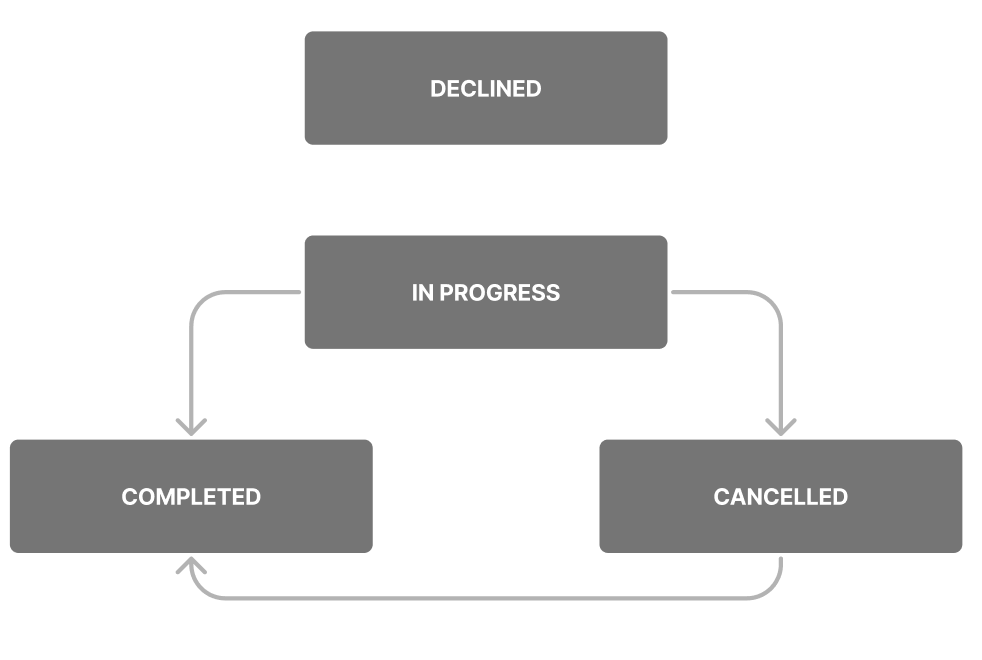
The possible state values are:
IN_PROGRESS- The transaction has been authorized but not captured.COMPLETED- The transaction has been captured and/or settled.DECLINED- The transaction has been declined.CANCELLED- The transaction has been cancelled.UNKNOWN- Default fallback status if the state can't be confirmed.
The transition from CANCELLED to COMPLETED is an edge case. Wise will release user funds after 7 days (30 days for pre-authorization) if the merchant has not captured the transaction and the state is moved to CANCELLED. After this, the merchant can decide to capture the transaction after the release of funds, the state will then be moved to COMPLETED.
For a detailed list of decline reasons see here.
To receive webhook events on changes in a user's balance, see balance update events.
For the V4 endpoints to get transaction by ID and list transactions for a card, only transactions created in the past 90 days can be accessed. A 422 error code will be returned otherwise.
The V4 card transaction endpoints should be used in conjunction with the card transaction state change webhook for versions 2.1.0 and later, while the V3 get card transaction endpoint should be used in conjunction with the V2.0.0 card transaction state change webhook. Existing partners looking to upgrade versions for card transaction endpoints and webhook should perform the upgrade together, for both API and webhook.
For a simple solution to display all actions that have been performed on a user account, see the activity API.