Retrieve information on transactions made on your users' cards.
Transaction types
The possible type values are:
ACCOUNT_CREDIT- Receiving money on the card, excluding Visa OCT or Mastercard MoneySendACCOUNT_FUNDING- Sending money to another card or e-walletCASH_ADVANCE- Cash disbursementCASH_WITHDRAWAL- ATM withdrawalCHARGEBACK- Currently unused. Reserved for future useCREDIT_TRANSACTION- Visa OCT and Mastercard MoneySendECOM_PURCHASE- Online purchasePOS_PURCHASE- Purchase via a POS terminalREFUND- Partial or full refund of an existing card transaction
Transaction states
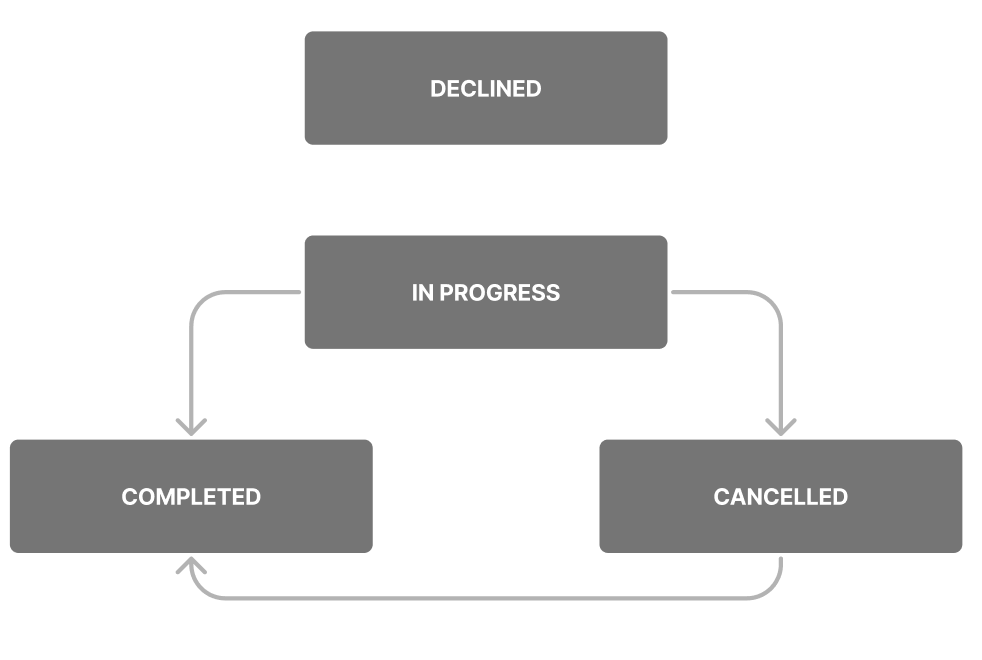
The possible state values are:
IN_PROGRESS- The transaction has been authorized but not capturedCOMPLETED- The transaction has been captured and/or settledDECLINED- The transaction has been declinedCANCELLED- The transaction has been cancelledUNKNOWN- Default fallback status if the state cannot be confirmed
The transition from CANCELLED to COMPLETED is an edge case. Wise releases the customer funds after 7 days (30 days for pre-authorization) if the merchant has not captured the transaction, and the state becomes CANCELLED. However, the merchant can decide to capture the transaction at a later date, at which point the state will become COMPLETED.
Decline reasons
The decline reason field provides information about the specific issue that led to the transaction being declined, helping the merchant and the customer troubleshoot the problem.
While the decline reason field provides valuable information, it may not cover all possible reasons for a decline, such as technical issues or unforeseen circumstances.
New decline reasons may be added in the future, and not all decline reasons are currently documented. Review this documentation regularly to ensure accuracy.
Exercise caution when communicating decline reasons to your customers, as some may not be relevant or may cause confusion.
ACCOUNT_INACTIVE- Balance related to the transaction is not active. Ensure that all outstanding actions have been completed before using the card, as this may help avoid potential issues or declinesACCOUNT_SUSPENDED- The transaction has been declined pending further compliance checks. It may have been flagged for potential sanctions issuesATM_PIN_CHANGE_NOT_ALLOWED- PIN change via ATM terminal is not allowedBLOCKED_COUNTRY- Transactions were made in unsupported countries. Check this link to see if the country is included in the list of supported nations. It is possible for a merchant to be based in a supported country and have an address registered in a blocked country, albeit infrequentlyBLOCKED_SUBSCRIPTION- The system cannot facilitate this transaction as the customer has opted out of recurring payments with this merchantCARD_EXPIRED- The card provided has reached its expiration date, making it invalid for this transactionCARD_FROZEN- The customer or the customer service team has put this card on a temporary hold. If the card has not been frozen by the customer, it may be worth investigating further. To resume spending, advise the customer to unfreeze the cardCARD_INACTIVE- The card is either not active or has not been received by the customer, so the transaction cannot proceedCARD_BLOCKED- The card has been blocked and cannot be used anymoreCARD_PARTNER_SUSPENDED- The internal team has deactivated the account for compliance reasons related to AML, fraud, or EDD. Contact the team if this is believed to be an errorCHIP_PIN_ENTRY_TRIES_EXCEEDED- The PIN is restricted on the chip of the card due to excessive incorrect entries. The blocked PIN can be unlocked at an ATM using specific steps that vary depending on the machine and country, such as PIN management or PIN operations followed by unblocking the PINCONNECTION_ISSUE- A connection problem occurred during the transactionCONTACTLESS_PIN_ENTRY_REQUIRED- Contactless payment systems sometimes require a PIN for authentication purposes to protect users' accounts from potential fraud or tampering. In Europe, contactless payment transactions that follow one after the other require PIN verification as an additional security measureCREDIT_TRANSACTIONS_NOT_SUPPORTED- Credit is not supported for this specific transaction. Review the Acceptable Use Policy for further informationCUMULATIVE_LIMIT_EXCEEDED- In certain jurisdictions, there are restrictions on the amount that can be spent. Refer to spending limits for further detailsDECLINED_ADVICE- There is a problem with the message from the processor, so it might not be accepted because it could be incomplete or unsafe. This does not indicate a problem with the card. Advise the customer that there was a technical issue with the payment and to try again laterINCORRECT_CVV- The customer entered the wrong security code. Advise the customer to check their card details and try again. If the saved card details are correct, they should remove their card details from the merchant's website and add them back againINCORRECT_EXPIRY_DATE- The customer entered the wrong expiration date for their card. If the saved card details are correct, they should remove their card details from the merchant's website and add them back againINCORRECT_PIN- The customer entered their PIN incorrectly. Advise the customer to check their PIN and try again. If the PIN is correct and still fails, suggest resetting the PININSUFFICIENT_FUNDS- The customer does not have enough money in their account to make the payment. Advise the customer to add money to their account and try again. In most cases, this will resolve the issueINVALID_3DS_UCAF- The 3D Secure checks failed during the transaction. The customer should try again and request authenticationINCORRECT_ARQC- ARQC (Authorization Request Cryptogram) is a cryptogram generated by the card during a transaction, which is validated on the server side. If incorrect, it could indicate a faulty card, a fraudulent attack, or an issue with the POS terminalINCORRECT_ICVV- ICVV (Integrated Circuit Card Verification Value) is a security feature used to validate the authenticity of a card during chip-based transactions. There were problems reading the chip on the card, which may indicate an issue with the card's chip, the terminal, or the transaction process. Wait and try againINVALID_MERCHANT- Transaction from a specific merchant is declined by scheme. The merchant should clarify the exact cause with the schemeINVALID_TRANSACTION- Certain types of transactions are not supported. The customer should ask the merchant to use a different payment method or try a different merchantMANDATE_DCC_NON_SUPPORTED_FOR_CARD_COUNTRY- The transaction was declined because the system does not support conversions for Brazilian cards when BRL is involved. BRL will not be automatically exchanged to other currencies. If the customer wants to continue with the payment, they need to change the currencyMANDATE_LOCAL_CASH_WITHDRAWAL_NOT_ALLOWED- ATM withdrawal services are not provided in the country where the transaction is taking placeNON_SUPPORTED_CURRENCY- The currency in this transaction is not supportedNON_SUPPORTED_MCC_FOR_COUNTRY- Transactions in this category are not supported for customers in the country of purchase. Consider using an alternative payment method or changing merchantPAYMENT_METHOD_DAILY_LIMIT_EXCEEDED- The customer has reached the daily spending limit for the card or their profile. Advise if they would like to update card or profile limitPAYMENT_METHOD_LIFETIME_LIMIT_EXCEEDED- The customer has reached the lifetime spending limit. Advise if they would like to increase their lifetime limitPAYMENT_METHOD_MONTHLY_LIMIT_EXCEEDED- The customer has reached the monthly spending limit for the card or their profile. Advise if they would like to update card or profile limitPAYMENT_METHOD_NOT_ALLOWED- This payment type has been disabled. Advise if they would like to enable the payment typePAYMENT_METHOD_TRANSACTION_LIMIT_EXCEEDED- The customer has exceeded the transaction limit for the card. Advise if they would like to update their card limitPIN_ENTRY_TRIES_EXCEEDED- The customer has reached the maximum number of allowed online PIN entry attempts. Consider implementing a reset PIN feature within the app to help the customer regain access to their cardPRE_ACTIVATED_CARD_PIN_ENTRY_REQUIRED- The customer has attempted to make a contactless payment at a POS or ATM, but their card has not been activated for chip and PIN transactions. To modify the card activation strategy for all cards, contact the implementation managerPROCESSING_ERROR- The system is currently experiencing technical difficulties. Advise the customer to try again after a brief periodRESTRICTED_MODE- Although rare, restricted mode can occur. Advise the customer to replace their card promptly as the system should have already informed them. In this mode, more secure payment methods like chip and PIN, contactless, mobile wallets, and online payments with 3DS are allowed, while less secure methods like magnetic stripe and online payments without 3DS are not permittedREVERSAL_NOT_MATCHING_AUTH_CURRENCY- The merchant has issued a reversal instruction for a different currency than what was originally requested during the authorization processSCA_SOFT_DECLINE- The transaction cannot proceed due to SCA regulations. Suggest the customer contact the merchant and use a more secure authentication method such as 3DS. For example, the customer can try chip and PIN, or a mobile wallet like Apple Pay or Google PaySCHEME_BLOCKED_TRANSACTION- This transaction has been flagged by the scheme and cannot be processedSECURITY_CVM_FAILURE- The system has detected that the POS terminal was misconfigured and failed security checks. Suggest the customer use an alternative payment method like contactless or mobile wallets, or recommend asking the merchant to accept a signature insteadSECURITY_MAGSTRIPE_SECURE_ELEMENTS_INCORRECT_OR_MISSING- The merchant has entered the wrong type of purchase. Advise the customer to contact the merchant and ask them to correct this issueSECURITY_PIN_ENTRY_REQUIRED- To proceed with this transaction, the customer is required to enter their PINSUSPECTED_FRAUD- This transaction has been labeled as high-risk by WiseSUSPECTED_FRAUD_AML- This transaction has been flagged as high-risk based on AML compliance protocols. This reason cannot be disclosed to end customersSUSPECTED_FRAUD_COMPLIANCE- The compliance system has flagged this transaction as high-risk. This reason cannot be disclosed to end customersSUSPECTED_FRAUD_CORE_FRAUD- This transaction has been blocked based on fraud policies and proceduresSUSPECTED_FRAUD_SANCTIONS- This transaction has been flagged as high-risk based on sanctions list analysis. This reason cannot be disclosed to end customers. This classification is final and cannot be appealedSUSPECTED_FRAUD_SOFT_DECLINE- This e-commerce transaction cannot be processed due to high risk factors. The merchant must complete 3DS before the transaction can be approvedTRANSACTION_TYPE_NOT_SUPPORTED- There are restrictions on this type of transaction, and sometimes the scheme will not allow it. Check if spend control is set up to block this transactionUNEXPECTED_ERROR- There may have been a communication error between the merchant's system and the server, but the POS system may have already notified the user of this issue
Detailed decline reasons
Detailed decline reasons provide secondary level information for certain decline reasons, adding more context to transaction failures.
Please be aware that new detailed decline reasons may be added in the future, and not all reasons are currently documented. Therefore, it is important to exercise caution and regularly review the documentation to ensure accuracy.
Please exercise caution when communicating reasons to your customers, as some may not be relevant or may cause confusion. If you have any questions or concerns, we are here to assist you.
INSUFFICIENT_FUNDS_FOR_BLOCKED_SMART_CONVERSION- Transaction was declined due to insufficient balance in transaction currency when smart conversion feature is disabled (e.g. BRL cards). The customer needs to convert their funds to the transaction currency and try again.INSUFFICIENT_FUNDS_FOR_SPECIFIC_CURRENCY_RESERVATION- The transaction will be declined with this reason if the customer's card is issued in a region subject to smart conversion limitations, and the transaction currency is the limited currency but the customer doesn't hold enough of that currency. Other currencies won't be automatically converted to the limited currency. The customer needs to convert their funds to the transaction currency before retrying the payment.SUSPECTED_FRAUD_NO_BALANCE- The customer might be abusing merchants by saving a card without having any balance to cover upcoming charges from them. The customer will need to top up their account to cover any charges from the merchant at a later date before re-attempting the transaction.RESET_YOUR_PIN_AT_ATM- There's a problem with how Chip was read and we had to decline the transaction. The customer will need to reset their PIN at an ATM.INCORRECT_CVV2- Invalid CVV2 was provided. The customer needs to check their saved card details and if they're correct, they should remove and add their card details to the merchant's website again. If this doesn't help, they could try to use their card at another merchant's website. If the same issue happens, they'll need to order a new card.SCA_SOFT_DECLINE_CONTACTLESS- Contactless transaction could not be approved due to SCA regulations. The customer should perform at least one PIN transaction or use an ATM to reset PIN.SUSPECTED_FRAUD_REVIEW_ACTIVITY- We couldn't confirm all transactions in the customer's activity were done by them, so we froze their card. The customer should review recent transactions and unfreeze the card.INVALID_TRANSACTION_TYPE_FINAL- This decline reason is used for unmapped processor or network error codes, indicating an external system issue or unclassified response. The decision authority on the transaction information identifies a SCHEME decline, which may relate to card usage in unsupported countries. The customer will need to use an alternative payment method to complete this transaction.INVALID_TRANSACTION_TYPE_CONTACTLESS_MAGSTRIPE- The POS terminal used a deprecated and not secure way to transmit card data. The customer will need to use another POS machine or try another payment method (Chip and PIN or Mobile Wallet).INVALID_TRANSACTION_TYPE_FALLBACK- The chip couldn't be read due to a technical issue which resulted in the transaction "falling back" to magnetic stripe. As damaging the chip (so it would fall back to stripe) is a common way of fraud, these types of transactions are often deemed risky and being blocked. The customer will need to:- Try again or try a different terminal / ATM if it still doesn't work
- Use another payment method, e.g. Contactless
- Use another card
- If the issue persists with multiple terminals, they'll need to replace their card as it may be damaged
CONTACTLESS_DISABLED-POS_CONTACTLESSpermission (contactless payments) is disabled. The customer will need to enable the permission to allow contactless transactions.ECOM_DISABLED-ECOMpermission (online payments) is disabled. The customer will need to enable the permission to allow e-commerce transactions.CHIP_DISABLED-POS_CHIPpermission (Chip transactions) is disabled. The customer will need to enable the permission to allow Chip transactions.MAGSTRIPE_DISABLED-POS_MAGSTRIPEpermission (magnetic stripe transactions) is disabled. The customer will need to enable the permission to allow magnetic stripe transactions.WALLET_DISABLED-MOBILE_WALLETSpermission is disabled. The customer will need to enable the permission to allow mobile wallet transactions.PROFILE_GENERAL_DAILY_LIMIT_EXCEEDED_CHANGEABLE- The customer has reached their daily total account limit (profile-level). The customer will need to edit the limit.PROFILE_GENERAL_MONTHLY_LIMIT_EXCEEDED_CHANGEABLE- The customer has gone over their monthly total account limit (profile-level). The customer will need to edit the limit.CARD_GENERAL_DAILY_LIMIT_EXCEEDED_CHANGEABLE- The customer has reached their daily limit for this card (card-level). The customer will need to edit the limit.CARD_GENERAL_MONTHLY_LIMIT_EXCEEDED_CHANGEABLE- The customer has gone over the monthly limit for this card (card-level). The customer will need to edit the limit.PAYMENT_METHOD_MAX_MONTHLY_LIMIT_EXCEEDED- The card's maximum non-changeable monthly spending limit has been reached. The customer will need to wait until the start of the next calendar month to perform transactions again.UNKNOWN- This decline reason is used when the processor or network returns an error code that is not mapped to any of our specific detailed decline reasons. This can be caused by various external system issues or unclassified processor responses.
Retrieve a card transaction by its ID.
Use in conjunction with the card transaction state change webhook for versions V2.1.0 and later.
Only transactions created in the past 90 days can be accessed. A 422 error code will be returned otherwise.
When a refund happens, a separate transaction will be added with a REFUND transaction type.
Optional UUID for correlating requests across systems. If provided, Wise echoes it back in the response. Maximum 36 characters. Learn more.
- Production Environmenthttps://api.wise.com/2026Q4/spend/profiles/{profileId}/cards/transactions/{transactionId}
- Sandbox Environmenthttps://api.wise-sandbox.com/2026Q4/spend/profiles/{profileId}/cards/transactions/{transactionId}
curl -i -X GET \
  https://api.wise.com/2026Q4/spend/profiles/123456/cards/transactions/342671 \
  -H 'Authorization: Bearer <YOUR_JWT_HERE>' \
-H 'X-External-Correlation-Id: f47ac10b-58cc-4372-a567-0e02b2c3d479'Card transaction retrieved successfully.
Echoed back when X-External-Correlation-Id was included in the request. Learn more.
Type of the transaction. One of:
ACCOUNT_CREDITACCOUNT_FUNDINGCASH_ADVANCECASH_WITHDRAWALCHARGEBACKCREDIT_TRANSACTIONECOM_PURCHASEPOS_PURCHASEREFUND
The current state of the transaction. One of:
IN_PROGRESSCOMPLETEDDECLINEDCANCELLEDUNKNOWN
When the transaction was last updated
Time at which reserved funds will be released after the authorisation hold expires
Transaction amount, including any embedded fees such as ATM fees that are not applied by Wise
Also called authorization code. This can be used to prove ownership of a customer's card/account to a merchant
PIN validation result. One of:
ONLINE_PIN_VALIDATEDONLINE_PIN_INVALIDOFFLINE_PIN_VALIDATEDOFFLINE_PIN_INVALIDNOT_RECEIVED
Balance channel reference ID associated with the card transaction
Array of debits. Only present when retrieving a single transaction by ID.
The debits list is a non-aggregated list of debit movements, meaning that the balanceId is not unique in the list. For example, a cancelled transaction may have a list of 2 debits where the absolute values of debitedAmount.amount, forAmount.amount and fee.amount are the same, but one is the negation of the other due to a reservation (first debit) which was then released (second debit with negated amounts). You can choose to perform the aggregation in your system or display the full list of debits to the end customer.
{
  "id": 342671,
  "cardToken": "59123122-223d-45f9-b840-0ad4a4f80937",
  "type": "ECOM_PURCHASE",
  "state": "IN_PROGRESS",
  "declineReason": null,
  "detailedDeclineReason": null,
  "creationTime": "2022-11-28T08:17:54.241Z",
  "modificationTime": "2022-11-28T08:17:54.241Z",
  "purgeTime": "2022-11-28T08:17:54.241Z",
  "transactionAmount": {
    "amount": 1.4,
    "currency": "SGD"
  },
  "fees": [
    {
      "amount": 0.1,
      "currency": "SGD",
      "fee_type": "ATM_MACHINE"
    }
  ],
  "transactionAmountWithFees": {
    "amount": 1.5,
    "currency": "SGD"
  },
  "merchant": {
    "name": "Test Payment",
    "location": {
      "country": "France",
      "city": "Rouen",
      "zipCode": "00000",
      "region": null,
      "state": null
    },
    "category": {
      "name": "MISCELLANEOUS_FOOD_STORES_CONVEN",
      "code": "5999",
      "description": "5999 R Miscellaneous and Special"
    }
  },
  "authorisationMethod": "MANUAL_ENTRY",
  "approvalCode": "913647",
  "billingAmount": {
    "amount": 1.1,
    "currency": "EUR"
  },
  "arn": "04300014127798385983852",
  "pinValidationResult": "ONLINE_PIN_VALIDATED",
  "balanceChannelReferenceId": "6e71018d-2f4d-4fc3-6711-f517f4664712",
  "debits": [
    {
      "balanceId": 52832,
      "debitedAmount": { … },
      "forAmount": { … },
      "rate": 1.36363636364,
      "fee": { … },
      "creationTime": "2022-11-28T08:17:54.241Z"
    }
  ],
  "credits": [
    {
      "balanceId": 52832,
      "creditedAmount": { … },
      "creationTime": "2022-11-28T08:17:54.241Z"
    }
  ],
  "relayAuthorisationData": {
    "responseCode": "APPROVED",
    "fallback": true
  }
}