These APIs are designed to allow you to print and encrypt your card directly from a kiosk machine. The card information will be sent to our card manufacturer to configure and print the card on-site on a kiosk machine.
The card printing process will automatically begin once the request is received by our card manufacturer.
During the printing process, you will be notified via webhook about any card production status change.
Before using these APIs, make sure to read the guide on kiosk collection.
Please reach out to your Implementation Manager for more information on these APIs.
Testing: In the sandbox environment, use the card production simulation API to test your integration with various production statuses and error scenarios.
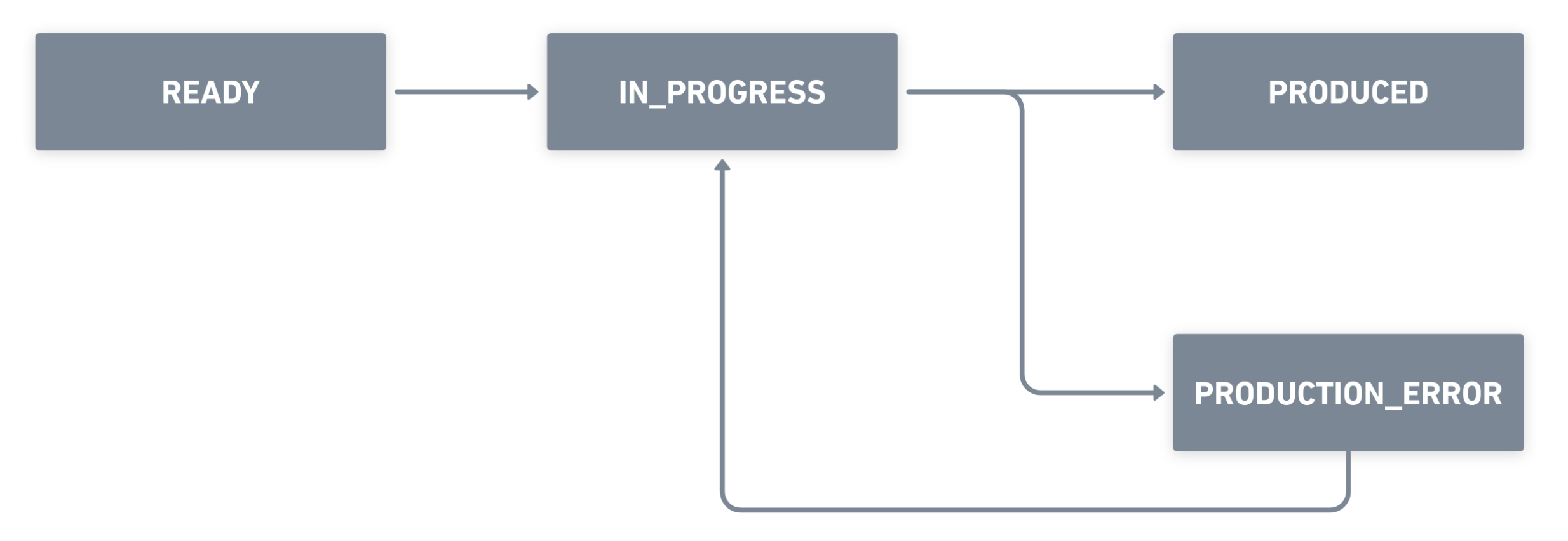
Production status flow
These statuses represent the lifecycle of a card production:
READY- Card is ready for production. The produce card endpoint can be called.IN_PROGRESS- Card is being produced at the kiosk machine (chip encryption and printing in progress).PRODUCED- Card has been successfully produced and collected from the kiosk. This is a final state.PRODUCTION_ERROR- Card production failed. Check the errorCode to identify the issue, resolve it, then retry using the produce card endpoint.
A card with production status PRODUCED will trigger an asynchronous call to update the associated card order to PRODUCED status.
Sends the card production request to a kiosk machine. To confirm that card information has been successfully created, listen to the card-production-status-change webhook with status READY.
Cards that were created over 60 days ago will result in a 422 error code and cannot be retried. This is due to the data being obfuscated on our side. In this case, a new card order has to be created.
Optional UUID for correlating requests across systems. If provided, Wise echoes it back in the response. Maximum 36 characters. Learn more.
- Production Environmenthttps://api.wise.com/v3/spend/profiles/{profileId}/cards/{cardToken}/production
- Sandbox Environmenthttps://api.wise-sandbox.com/v3/spend/profiles/{profileId}/cards/{cardToken}/production
curl -i -X PUT \
  https://api.wise.com/v3/spend/profiles/123456/cards/ca0c8154-1e14-4464-a1ce-dcea7dc3de52/production \
  -H 'Authorization: Bearer <YOUR_JWT_HERE>' \
  -H 'Content-Type: application/json' \
  -H 'X-External-Correlation-Id: f47ac10b-58cc-4372-a567-0e02b2c3d479' \
  -d '{
    "kioskId": "WIS00001"
}'OK - The card information has been successfully sent to the kiosk machine.
Echoed back when X-External-Correlation-Id was included in the request. Learn more.
Current production status:
READY- Card is ready for productionIN_PROGRESS- Card is in production at the kiosk machinePRODUCED- Card is produced and collected. This is a final statePRODUCTION_ERROR- Card production failedREQUEST_ERROR- Card production request failed
Identifier that specifies which kiosk machine is producing the card. When the status is READY, this value is null.
Time when the card production request has been sent to the kiosk machine (ISO 8601 format).
Code returned when card production is not successful. Nullable.
Request errors - Returned when status is REQUEST_ERROR:
UNKNOWN_ERROR- An error occurred on the serverREQUEST_ALREADY_EXISTS- The request has already been submittedKIOSK_ID_NOT_FOUND- The kiosk ID does not existCARD_TYPE_NOT_FOUND- The card type does not existINVALID_FIELD_VALUE- Some field values are unexpectedINVALID_PIN_FORMAT- The PIN does not follow ISO0 or ISO2 standardEMPTY_OR_NULL_FIELD_VALUE- Some required fields are empty or nullEMPTY_OR_NULL_OR_WRONG_SIZE_FIELD_VALUE- Some required fields are empty, null, or have incorrect lengthsCHARSET_NOT_SUPPORTED- The character set for some fields is not supportedINVALID_FIELD_FORMAT- Some field formats are invalidINVALID_FIELD_ENCODING- The encoding for some fields is not expectedCDATA_ENCODING_OR_FORMATING_ERROR- The encoding or formatting for XML text field values is incorrectPIN_LENGTH_ERROR- The PIN length is incorrectPIN_VERIFICATION_FAILED- The PIN cannot be verified because the server is unreachableDATA_PREPARATION_FAILED- The server failed to parse the requestPARTIAL_DATA_RECEIVED- Only part of the expected data has been receivedNO_BRANCH_LINKED_TO_KIOSK- The kiosk has not been linked to any branchIMAGE_SERVER_ERROR- The image server is unreachable or failed to process the dataPAN_ALREADY_EXISTS- The PAN already existsPRINTER_OR_SATELLITE_NOT_READY- The printer or satellite is not ready to start the productionREQUEST_CREATED_BUT_NOT_STARTED- The request has been created, but production is pending until the printer or satellite is readyUNABLE_TO_ACCEPT_REQUEST- The system is currently busy and cannot accept new requests at this time
Production errors - Returned when status is PRODUCTION_ERROR:
CB_NOT_AVAILABLE- Main server error: central base not availableCB_DB_NOT_AVAILABLE- Main server error: database not availableCB_NETWORK_NOT_AVAILABLE- Main server error: network not availableCB_AUTHENTICATION_FAILED- Main server error: user authentication verification failedCB_SERVICE_NOT_ALLOWED- Main server error: the accessed service requires a higher security levelCB_TIME- Main server error: timeout occurred on the Central Base sideDP_NOT_AVAILABLE- Data processing error: the Data preparation module is not availableDP_IO_ERROR- Data processing error: Input/Output error when communicating with the DPDP_TIMEOUT- Data processing error: timeout errorSAT_SERVER_NOT_REACHABLE- Satellite agent error: the server is not reachableSAT_AUTHENTICATION_FAILED- Satellite agent error: user authentication failed on satelliteSAT_NETWORK_NOT_AVAILABLE- Satellite agent error: the network is not availablePRT_NOT_REACHABLE- Printer error: printer is not reachablePRT_SETUP_ERROR- Printer error: printer setup is incorrectPRT_TIMEOUT- Printer error: printer timeoutPRT_RIBBON- Printer error: ribbon errorPRT_LOCK_ERROR- Printer error: printer physically unlockedPRT_RIBBON_MISSING- Printer error: ribbon is missingPRT_RIBBON_ENDED- Printer error: ribbon has endedPRT_COVER_OPEN- Printer error: printer cover is openPRT_PAUSED- Printer error: printer pausedPRD_UNEXPECTED_DATA- Production error: production data is incorrectPRD_FEEDER_EMPTY- Production error: feeder is emptyPRD_FEEDER_JAM- Production error: feeder card jamPRD_HOPPER_FULL- Production error: hopper is fullPRD_HOPPER_DOOR- Production error: hopper door is openPRD_HOPPER_JAM- Production error: hopper card jamPRD_MAGSTRIPE- Production error: error occurred during magstripe encodingPRD_SMARTCARD- Production error: error occurred during chip personalizationPRD_EMBOSSER- Production error: error occurred during embossingPRD_TIMEOUT- Production error: production timeout has been reachedPRD_REJECT_FULL- Production error: reject box is fullPRD_SMARTCARD_CARD_NOT_IN_READER- Production error: card is not in readerPRD_FINAL_VALIDATION_NOK- Production error: user has rejected card productionINV_NOT_INITIALIZED- Production error: inventory not initializedUNKNOWN_ERROR- Unknown error
{
  "status": "IN_PROGRESS",
  "kioskId": "WIS00001",
  "occurredAt": "2024-01-01T12:24:56.121Z"
}