With this set of APIs, you will be able to create cards for your customers. You can also retrieve and view the status of your current card orders, as well as the list of available card programs for the user.
On production, each personal profile can order at most 1 physical card and 3 virtual cards. On sandbox, we allow up to 10 physical cards and 30 virtual cards for testing purpose. However, no more than 3 virtual cards can be ordered per day. This limit includes cards and card orders.
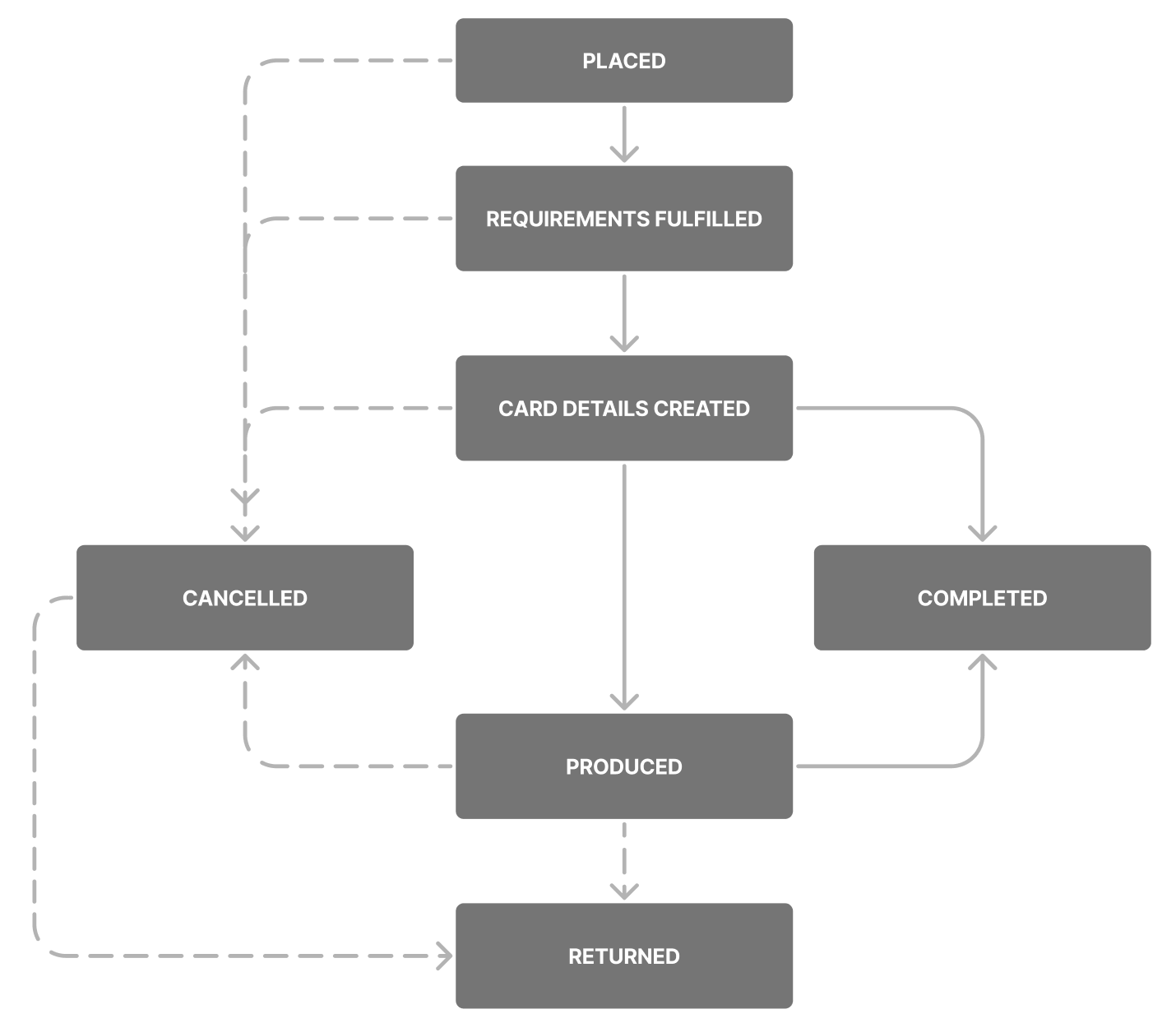
Card order status flow
The card order response will contain the status field. The initial status is PLACED or REQUIREMENTS_FULFILLED depending on the requirement fulfillment state:
PLACED- The card order is created. The card will be generated once it has fulfilled all the requirementsREQUIREMENTS_FULFILLED- The card order has fulfilled all the requirements and the card should be generated in a short whileCARD_DETAILS_CREATED- The card has been generatedPRODUCED- The physical card has been produced and waiting to be picked up by delivery vendor (physical card only)COMPLETED- The card has been activated and is ready to use. The card order is completedCANCELLED- The card order has been cancelled. This can happen if you reach out to Wise Support to cancel a card orderRETURNED- Delivery failed, the physical card has been returned and will be blocked (physical card only)
The card program associated with this card order. A Card Program is what Wise refers to all the cards that you will be issuing with us, grouped by product type and by issuing country.
Address set during card order. Required for physical cards. Optional for virtual cards (defaults to the profile address, if omitted). Fields vary by country. See the card address validation guide for country-specific fields and validation rules.
Token of the card associated with card order. Nullable.
Token of the card being replaced by this replacement card order. Nullable.
Time when the card order is created.
Time when the card order was last modified.
Status of the card order. See card order status flow for details.
The estimated time when the card will be delivered. There are few scenarios to be mindful of:
- For virtual card the delivery estimate will be close to the creationTime, as it does not require delivery.
- For physical card in
PLACEDstatus, the delivery estimate is calculated assuming that the order requirements will be fulfilled today (refreshed daily). - For physical card after
PLACEDstatus, we provide a best effort estimation, and it should not be used as delivery timing as we will have separate delivery tracking (subject to region availability) for physical card that is coming soon.
{
  "id": 142,
  "profileId": 123456,
  "clientId": "your-client-id",
  "cardProgram": {
    "name": "VISA_DEBIT_BUSINESS_UK_1_PHYSICAL_CARDS_API",
    "scheme": "VISA",
    "defaultCurrency": "GBP",
    "cardType": "PHYSICAL"
  },
  "address": {
    "firstLine": "56 Shoreditch High St",
    "secondLine": "The Tea Bldg",
    "thirdLine": null,
    "city": "London",
    "postCode": "E1 6JJ",
    "state": null,
    "country": "GB"
  },
  "cardToken": "4dc0be88-903f-49e4-8237-735f1139e3dd",
  "replacesCard": "4dc0be88-903f-49e4-8237-735f1139e3dd",
  "creationTime": "2023-07-31T01:43:24.596321434Z",
  "modificationTime": "2023-07-31T01:43:24.596321825Z",
  "status": "PRODUCED",
  "cardHolderName": "John Smith",
  "phoneNumber": "+441234567890",
  "lifetimeLimit": 100,
  "deliveryEstimate": "2023-10-30T07:11:00.848681Z",
  "deliveryDetails": {
    "deliveryOption": "POSTAL_SERVICE_WITH_TRACKING",
    "deliveryVendor": "DHL",
    "trackingUrl": "https://www.dhl.com/gb-en/home/tracking/tracking-express.html?submit=1&tracking-id=1999473803",
    "trackingNumber": "1999473803"
  }
}